

Background
There’s a lot of discourse about what tests matter in the age of AI-written code.
We’ve all seen how eager AI is to generate unit tests for you. Sometimes these are useful. A lot of times they just restate the implementation, so they don’t provide much confidence that the implementation is correct.
Some people are even going so far as to eliminate them. I think elimination is too extreme, as there is value in unit tests for functions with complicated logic.
But to test frontend behavior, I want to see how everything comes together in the UI. In order to do this, I need the tests to run in a browser that I can inspect.
One way to run browser-based tests is to use Playwright (or Puppeteer, Cypress, etc.) to build end-to-end tests. These are great as far as you can take them. But it is tremendously difficult to use them to exercise the full range of the user interface.
You cannot easily produce the variety of failure scenarios from the backend, such as slow responses or unexpected errors. Also e2e tests can interfere with each other since they often rely on state in the backend. You either have to isolate the state or run conflicting tests sequentially. Running them sequentially slows the suite down considerably.
To address these issues, I rely primarily on a comprehensive integration test suite built in Playwright, with the backend mocked.
Page tests
There are two main kinds of Playwright integration tests I use. Page tests cover the state and interactions on an individual page or the linkage between two pages. Ideally, the tests for these are exhaustive for all scenarios. The second is user journeys, which connect the pages into complete workflows that a user would recognize.
Let’s start with a page test. We generally need to mock the backend response, visit that page, and see what gets rendered.
Here’s a diagram of the idea:
Additionally, we need to test the various user interactions on the page and their result. We can extend the idea further:
To make this concrete, let’s look at a simple example. We’ll use the login page. This example is so simple that we don’t even need to mock any initial calls to the backend; it’s rendered purely by the app.
test("loads an empty login form with password recovery and signup links", async ({ page }) => {
  await page.goto("/login");

  await expect(page.getByRole("heading", { name: "Log in", exact: true })).toBeVisible();
  await expect(page.getByLabel("Email", { exact: true })).toBeVisible();
  await expect(page.getByLabel("Email", { exact: true })).toHaveValue("");
  await expect(page.getByLabel("Password", { exact: true })).toBeVisible();
  await expect(page.getByLabel("Password", { exact: true })).toHaveValue("");
  await expect(page.getByLabel("Password", { exact: true })).toHaveAttribute("type", "password");
  await expect(page.getByRole("button", { name: "Log in", exact: true })).toBeVisible();
  await expect(page.getByRole("button", { name: "Log in", exact: true })).toBeEnabled();
  await expect(page.getByRole("link", { name: "Forgot password?" })).toBeVisible();
  await expect(page.getByRole("link", { name: "Forgot password?" })).toHaveAttribute(
    "href",
    "/forgot-password"
  );
  await expect(page.getByRole("link", { name: "Sign up", exact: true })).toBeVisible();
  await expect(page.getByRole("link", { name: "Sign up", exact: true })).toHaveAttribute(
    "href",
    "/signup"
  );
});
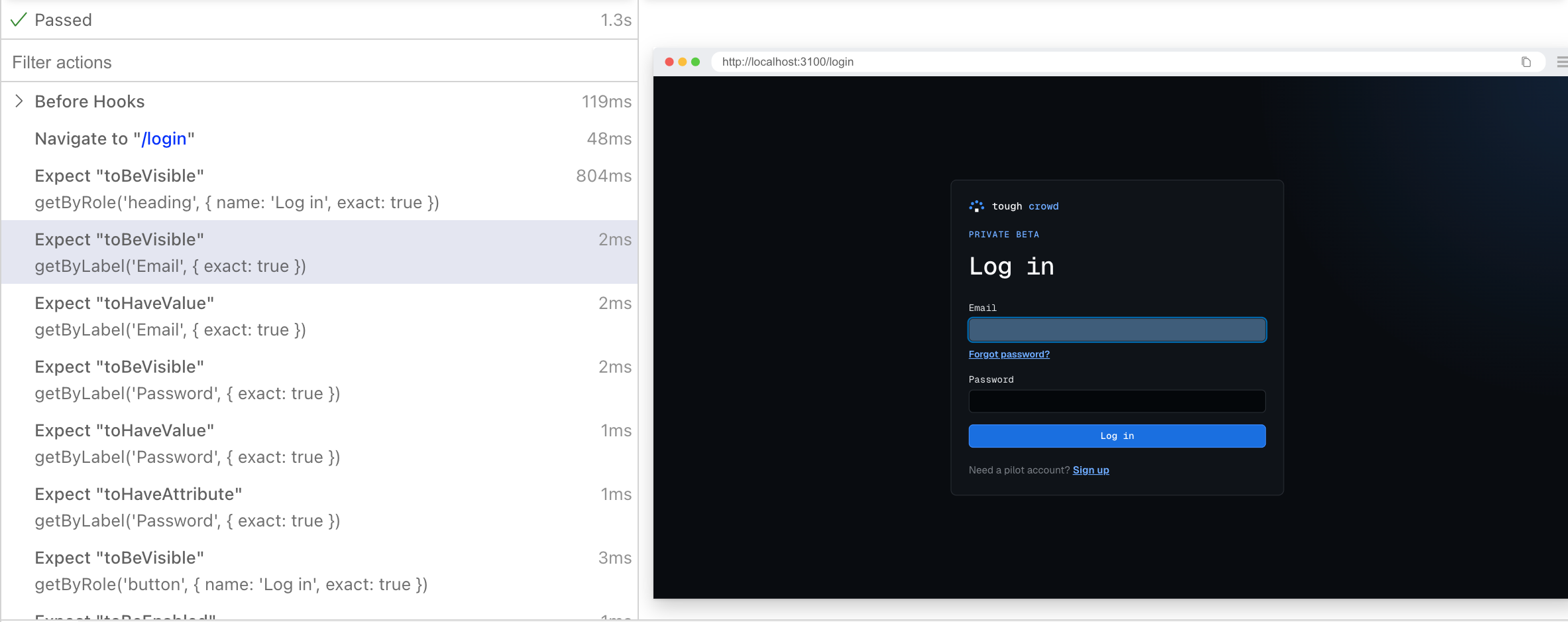
When you run the test in the interactive Playwright test runner, you can see each step working. For example:
Now let’s look at a test that performs an action. We’ll show what it looks like to log in successfully:
test("logs in with valid credentials and shows the sessions page", async ({ page }) => {
  await mockPostLoginPage(page);
  const loginRequests: unknown[] = [];
  await page.route(/\/api\/auth\/sign-in\/email$/, async (route) => {
    loginRequests.push({
      method: route.request().method(),
      body: route.request().postDataJSON()
    });
    await fulfillJson(route, { user: { id: "8f24c6a1-3d75-4b92-a8e6-1c09d5f7b340" } });
  });

  await page.goto("/login");
  await page.getByLabel("Email").fill("matt@example.com");
  await page.getByLabel("Password").fill("correct-horse-battery-staple");
  await page.getByRole("button", { name: "Log in", exact: true }).click();

  await expect(page).toHaveURL(/\/sessions\?status=all$/);
  expect(loginRequests).toEqual([
    {
      method: "POST",
      body: { email: "matt@example.com", password: "correct-horse-battery-staple" }
    }
  ]);
  await expect(
    page.getByRole("region", { name: "All sessions" }).getByText("No sessions yet").first()
  ).toBeVisible();
  await expect(page.getByRole("button", { name: "Matt example", exact: true })).toBeVisible();
});
This test uses two helpers. The first is the mockPostLoginPage, which is shorthand for mocking all of the endpoints that the page we get redirected to after login will make requests to. The second helper is fulfillJson, which is just a quick way to assemble a JSON response with the correct headers.
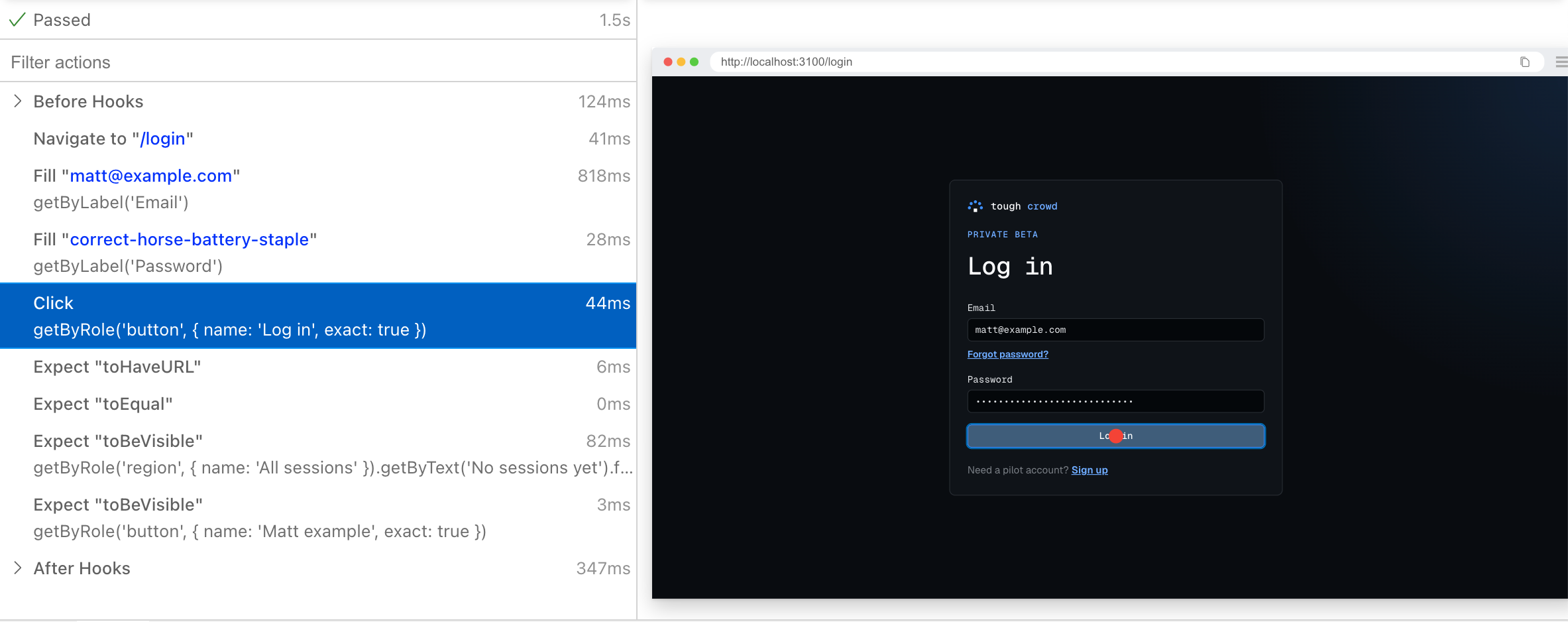
Now, take a look at the page.route function. It sets up a route handler to intercept requests to the /api/auth/sign-in/email endpoint. The handler records the method and body of the request and then returns a 200 (the default) along with the JSON payload containing the user id. We can then verify later that the request was formed correctly and that the page behaved properly by redirecting us to the Sessions page, which we see rendered in turn.
To demonstrate how we can use mocking to simulate failure scenarios, let’s look at an incorrect email or password test.
test("keeps failed credentials on the form and signs in after a corrected password", async ({
  page
}) => {
  await mockPostLoginPage(page);

  const attempts: unknown[] = [];
  await page.route(/\/api\/auth\/sign-in\/email$/, async (route) => {
    attempts.push(route.request().postDataJSON());
    if (attempts.length === 1) {
      await fulfillJson(route, { message: "Invalid email or password." }, 401);
      return;
    }
    await fulfillJson(route, { user: { id: "user-1" } });
  });

  await page.goto("/login");
  await page.getByLabel("Email").fill("matt@example.com");
  await page.getByLabel("Password").fill("wrong-password");
  await page.getByRole("button", { name: "Log in" }).click();

  await expect(page).toHaveURL(/\/login$/);
  await expect(page.getByText("Invalid email or password.")).toBeVisible();
  await expect(page.getByLabel("Email")).toHaveValue("matt@example.com");
  await expect(page.getByLabel("Password")).toHaveValue("wrong-password");

  await page.getByLabel("Password").fill("correct-horse-battery-staple");
  await page.getByRole("button", { name: "Log in" }).click();

  await expect(page).toHaveURL(/\/sessions(?:\?|$)/);
  expect(attempts).toEqual([
    { email: "matt@example.com", password: "wrong-password" },
    { email: "matt@example.com", password: "correct-horse-battery-staple" }
  ]);
});
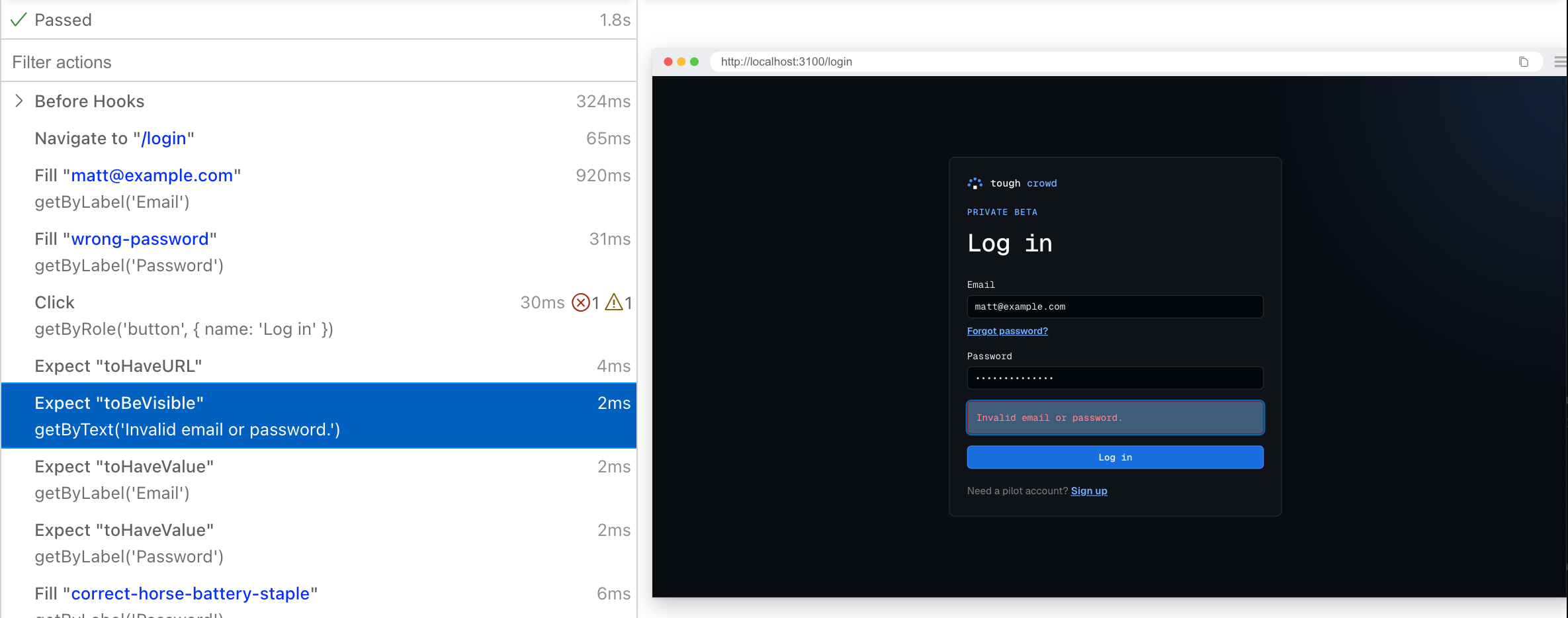
If you take a close look at the page.route handler, it fails the first request with a 401 and then succeeds on the second request. At the end we can see that the two requests were formed correctly. And we can inspect the error state in the test runner.
With these techniques, you can enumerate virtually all of the frontend behavior of your application.
However, it can be hard to verify if the product ties together just through these page tests. So I like to incorporate another type of integration test: user journeys.
User Journeys
This is where we identify the main paths a user will take through your product and simulate them using the same basic technique.
The goal of user journey tests is not to specify all of the possible outcomes on each page, but rather to check whether those behaviors fit together into a cohesive experience for the user.
In my world of building a coding system, it’s journeys like:
- Onboarding: sign up -> complete setup -> see dashboard
- Invitations: invite a user to your organization
- Coding and release: start a coding session, get the result, see the PR, and merge to main
I’ve got them grouped into categories and this makes it easy to go in and look at how the product behaves in a wide variety of scenarios. Here’s my current list of categories.
journeys/
├── 01-access-and-setup/
├── 02-invitations/
├── 03-joining-an-organization/
├── 04-reviews-to-fix-sessions/
├── 05-sessions-and-release/
├── 06-reference-replay/
├── 07-issues/
├── 08-projects/
├── 09-incidents/
├── 10-insights/
├── 11-account-and-integrations/
└── 12-product-administration/
These end up touching multiple pages and the code can be quite lengthy.
Let’s take a look at one of the most important ones. This is to follow the user creating a new coding session, following it to completion, merging to main, and finally deleting the branch.
Here is the opening of that journey: submit a new session, verify the request, and check that the session detail page shows initialization. installJourneyMocks sets up the backend responses and records outgoing requests. The rest of the journey continues from this point.
As with the page tests, the backend routes are entirely mocked, including ones to merge the PR and delete the branch.
// Excerpt from the full journey test.
const journey = await installJourneyMocks(page);
const prompt = "Add a helpful empty state to the projects page with a Create project button.";
const header = page.locator('[data-slot="session-header"]');

await page.goto("/sessions/new");
await expect(page.getByRole("button", { name: "Repository: acme/web", exact: true })).toBeVisible();
await page.getByRole("textbox", { name: "What do you want to do?" }).fill(prompt);
await page.getByRole("button", { name: /^Start session/ }).click();

await expect(page).toHaveURL(/\/sessions\/ses_empty_state\?tab=activity$/);
expect(journey.requests.create).toEqual([
  {
    repository: "acme/web",
    prompt,
    agentProfile: "claude-code-cli-default",
    baseBranch: "main",
    branchMode: "create",
    model: "claude-sonnet-4.8",
    reasoningEffort: "medium"
  }
]);
await expect(header).toContainText("Initializing");
And here is a recording of the complete journey, showing what it looks like to start a coding session, submit the prompt, watch the output, merge the PR, and delete the branch.
These journeys all use the same underlying techniques as the page tests. However, since we have the page tests, they do not have to be exhaustive of all scenarios. And they let me inspect whether the complete workflow behaves like I want it to.
Getting started
The easiest thing to do is to point your agent at this page so it can learn the technique, then have it work on a small but important page. Login is usually a pretty good one. Have it create tests for all the scenarios and make sure you are mocking all your endpoints so you’re not accidentally calling your real backend when you run these. Run them in Playwright’s UI and inspect the assertions and browser states to make sure they accurately describe the behavior you want.
Once you’ve got a small area covered, add it to your CI. Once you’re comfortable with that, build out a lot more. If you get that far, you’re probably going to want to run these in shards in CI to make sure they don’t take forever. You have heavily optimized your CI, right?
My results
As of this writing, we have 776 Playwright tests running against 30,531 lines of frontend code. We have 79% line coverage, 60% branch coverage, and we see very little flakiness (maybe one or two test flakes a week, anecdotally).
I had AI analyze our CI runs for September to see how often we caught regressions with these tests. If we consider that the bug made it all the way to CI, caused a test to fail, and the fix was entirely to the code, not the test, we caught 27 distinct regressions.
Even better, AI also analyzed the coding sessions in September and found that of the 249 sessions that changed frontend code before pushing, 84 ran Playwright tests before pushing. Of those, 40 encountered failures. Seven of these identified application code failures while 23 had likely test, fixture, or expectation problems. The remaining ten had environment or execution problems, mixed causes, or unresolved failures.
One big downside that AI observed is that we saw web/ui changes in only 64% of the CI runs, but we ran the Playwright tests on 100%. We estimate that Playwright accounted for about $320-$340 of our September CI bill. So this suggests there are opportunities to skip runs when there are no relevant changes. A similar problem exists for the backend tests. We have not finished heavily optimizing our CI, apparently.
But just mechanically catching the bugs is not the whole story. These tests allow me to analyze whether the feature is behaving as expected in a variety of scenarios. If a change is UI heavy, it’s so easy to connect to the Playwright server on the coding session and watch all of the tests run to see if they match what I expect. And that might be the biggest benefit of all.